Building Customization in Verde
Make every Seedlet street feel handcrafted.
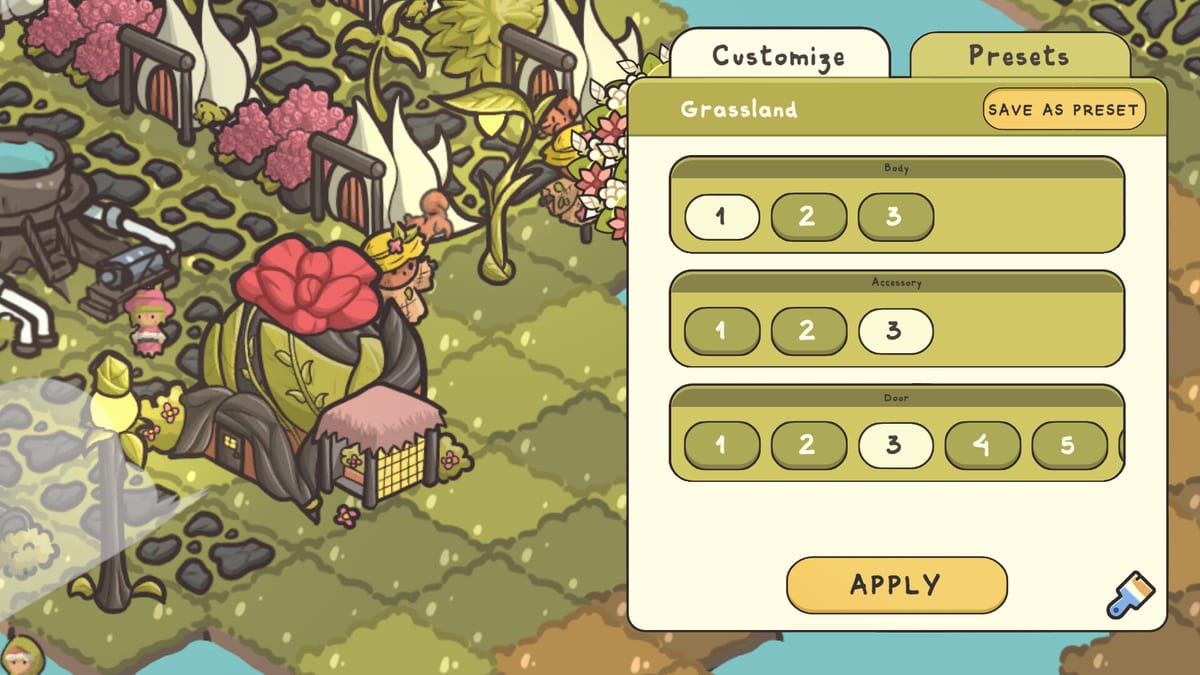
Verde’s customization tools are a major reason the game feels cozy instead of spreadsheet-like. Almost every structure you place can be tuned with the paintbrush: housing bodies, roof accessories, doors, colors, and even alternate looks for fountains, parks, and shops. This guide shows how to use those tools without turning every build into a chore.
See Buildings Overview for category roles and Decorations Priority for appeal-focused pieces.
Opening the paintbrush
Click a placed building and choose the paintbrush action. You will typically cycle body styles, accessories, door variants, and color channels. Some options stay locked in the demo; the full game widens the kit. Apply changes when satisfied. If the UI offers presets, save a combination you expect to reuse on the next three houses.
Why presets matter
A common complaint in cozy builders is repeating the same manual clicks on every new cottage. Presets reduce that friction. Create at least two housing presets — for example a soft green door set and a warmer autumn set — so districts can rhyme without becoming clones. Update presets when a new biome introduces different materials or shoreline vibes.
Customizing more than houses
Fountains, parks, playgrounds, potion shops, and other services often support alternate meshes or colors. Use that to signal district identity: one plaza style for the starter garden, another for the beach boardwalk. Custom social pieces also help screenshots in photo mode.
Practical styling workflows
- Block out functional placement first (water, services, housing).
- Add paths so silhouettes read clearly.
- Apply presets to housing rows.
- Customize landmark buildings individually.
- Add decoration last so color accents match the street.
If you reverse that order, you may spend Leaves repainting buildings you later move. Movement tools and multi-select quality-of-life from demo updates make redesign easier, but prevention is calmer.
Biome-aware aesthetics
Starter gardens love leafy greens and soft browns. Tropical parcels look coherent with brighter accents and shoreline specials such as ice cream stands. Snowy or cooler biomes — when available — benefit from restrained palettes and comfort buildings that already match the fantasy. Unlock Regions explains the mechanical needs; this page covers the visual follow-through.
Customization versus progression
Paint choices are primarily expressive. They will not replace a missing market. However, clearer visual language helps you manage the town: you can see which lane already received the “upgraded roof” pass and which lane still needs decoration points for a quest. That soft organizational benefit is why customization belongs in a systems wiki, not only an art tip list.
Common mistakes
- Manually recoloring twenty houses before discovering presets.
- Mixing five clashing body styles on a tiny cul-de-sac.
- Decorating before the heat map is stable, then demolishing the pretty blocks.
- Forgetting to customize large landmarks that dominate screenshots.
Next creative steps
Combine this page with Sandbox Mode for theme challenges, and Demo Guide if you want to practice paint tools before launch day. Official trailers on the Release Date page also showcase the handcrafted look Antimeta Studio is selling.
Color stories that survive biomes
Choose moss-and-cream for starter gardens, brighter accents for tropical boardwalks, and cooler neutrals for comfort climates. Apply stories through housing presets first, then echo them on lamps and plazas. Paint after footprints stabilize so multi-select redesigns do not erase your favorite doors.
Frequently Asked Questions
Quick answers to the most common questions.
Does customization affect happiness?
Happiness comes from demands and decoration buildings. Paint styles are mainly aesthetic, with organizational side benefits.
Can I customize utilities?
Many non-housing buildings support alternate looks. Try the paintbrush on anything landmark-sized.
Are all cosmetics in the demo?
No. The demo locks some options to preview the system.
What is the fastest way to unify a street?
Save a preset and apply it to each new house after placement.